
July 23, 2026
How to Create a Google Review QR Code: A Complete Guide
- How to make a Google Review QR code: Copy your Google Business Profile review link and generate a QR code using Google’s built-in tool or a review management platform like ReviewCook.
- Choose the right QR code type: Dynamic QR codes allow you to update the destination, track scan analytics, and customize the design without reprinting, making them ideal for long-term campaigns.
- Place your QR code where customers can see it: at checkout counters, on receipts, product packaging, thank-you cards, email newsletters, and storefront displays, to maximize review opportunities.
- Follow QR code best practices: Use a high-resolution file, maintain a strong color contrast, include a clear call to action, print it at an appropriate size, and test it before sharing.
- Why it’s important: A Google Review QR code simplifies the review process, helping businesses collect more authentic Google Reviews, strengthen their online reputation, and improve local search visibility over time.
What is a Google Review QR code, and how does it work?
A Google Review QR code is a scannable code that directs your customers straight to your Google Review page.
It makes it easier for customers to leave feedback, especially if displayed at customer touchpoints to collect immediate, authentic feedback and improve local search visibility
Creating a Google Review QR code helps businesses reduce friction in the review process, leading to more customer reviews, improved local search visibility, and building customer trust.
Whether you’re running a retail store, restaurant, clinic, hotel, or service-based business, displaying a QR code where customers interact with your brand encourages timely and authentic feedback.
How to make a Google Review QR Code on your Google Business Profile
- Go to your Business Profile.
- Select Read Reviews – Get more reviews .
- You can share the link or QR code directly or use the other options.
- To copy the review link, select Copy .
- To download the QR code:
- Right-click the QR code.
- Select Save image as….
Pros: Free to create and easy to use, making it an accessible way for businesses to collect Google reviews.
Cons: Google Reviews only generate static QR codes. You can’t edit the destination link or update information on your Google Review profile after printing. Google Review QR codes can also only be generated on a computer browser, not on mobile devices.
How to Make a Google Review QR Code with Review Cook: Step-by-Step Guide
Step 1: Go to ReviewCook
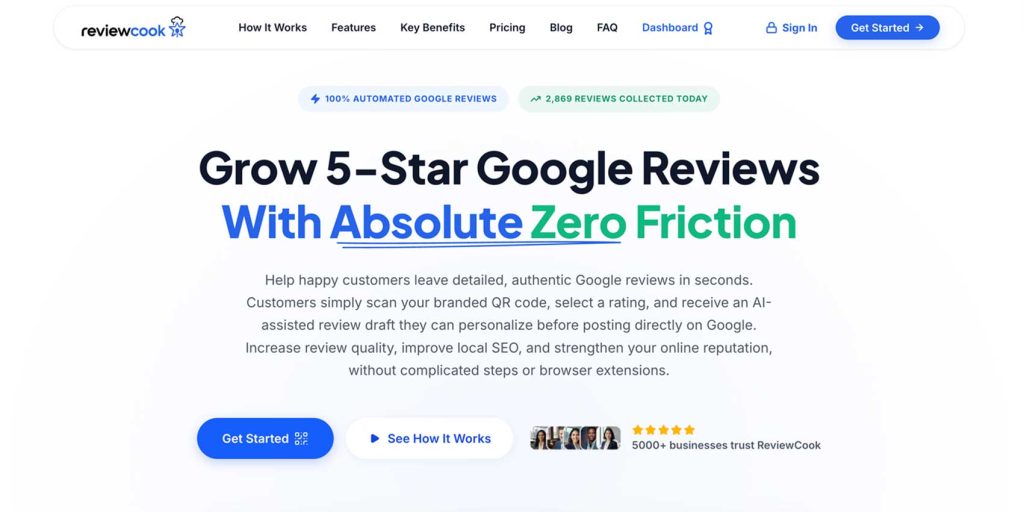
Step 2: Click “Get Started”
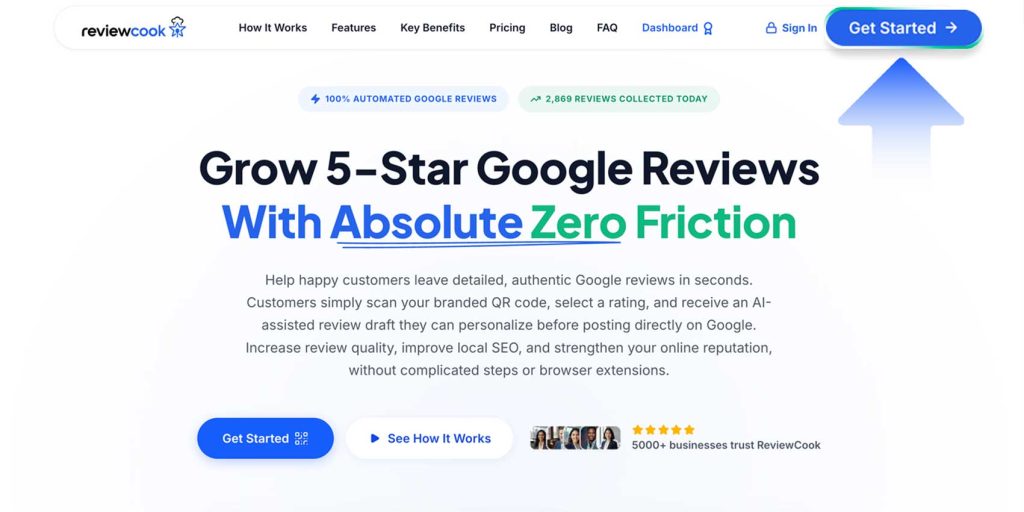
Step 3: Enter your details
Enter your name, business/company/organization’s name, email address, password, and click create free account
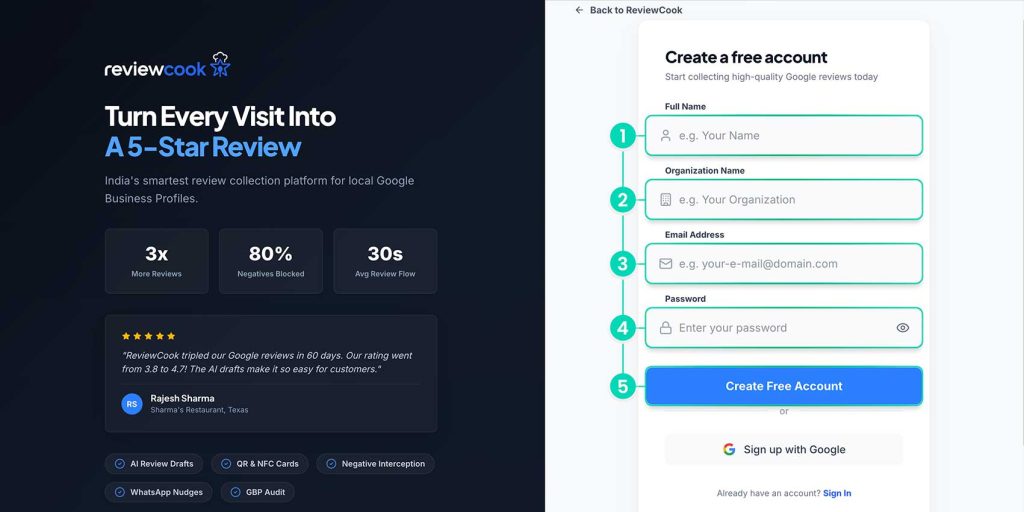
After creating your free ReviewCook account, you will be directed to the Configure Your ReviewCook Campaign step-by-step page.
Step 4: Enter your business name and choose your business’s category
After you’ve entered your business name, choose your business category, and click “Next Step”
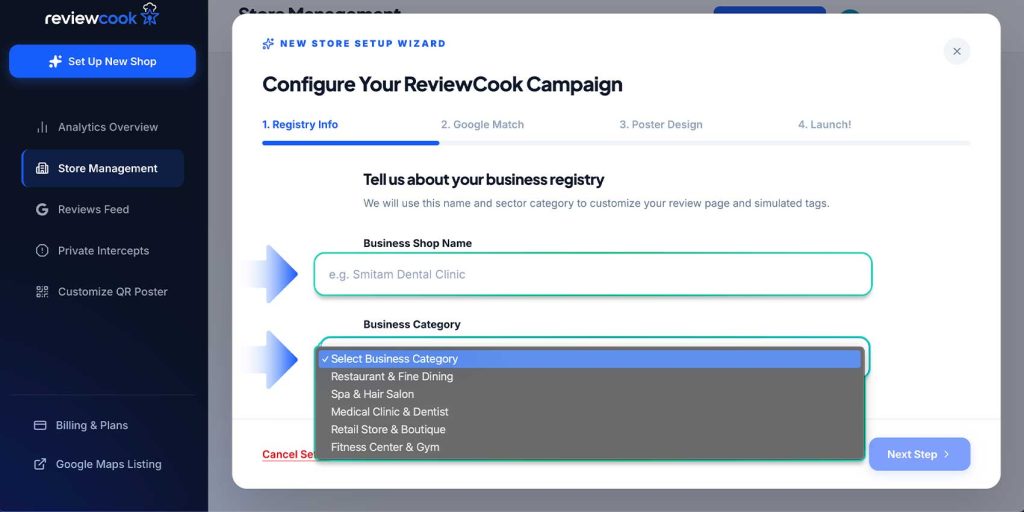
Step 5: Type your business name and select a match from Google Maps
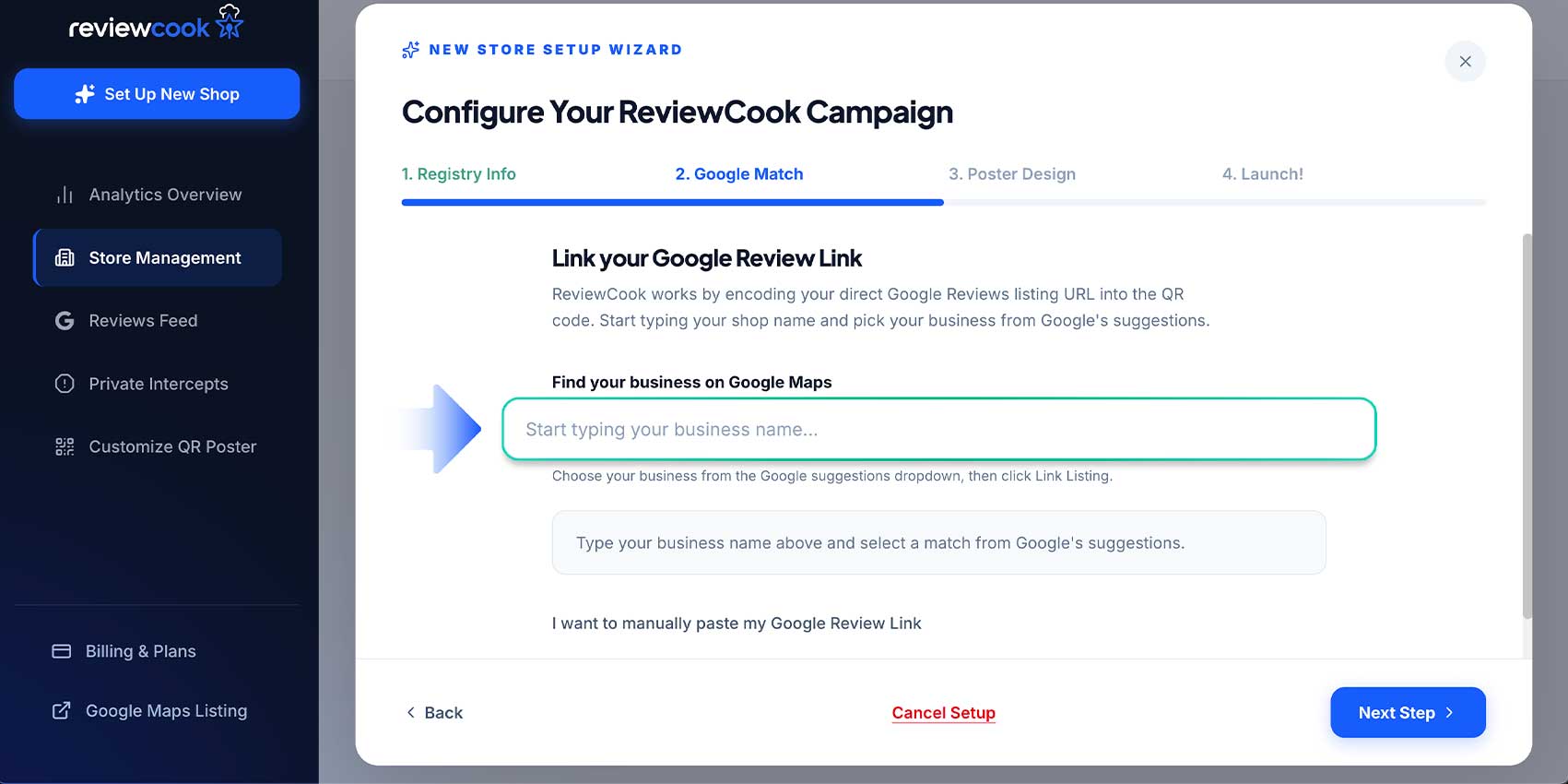
You can also manually input your business’ Google Review URL
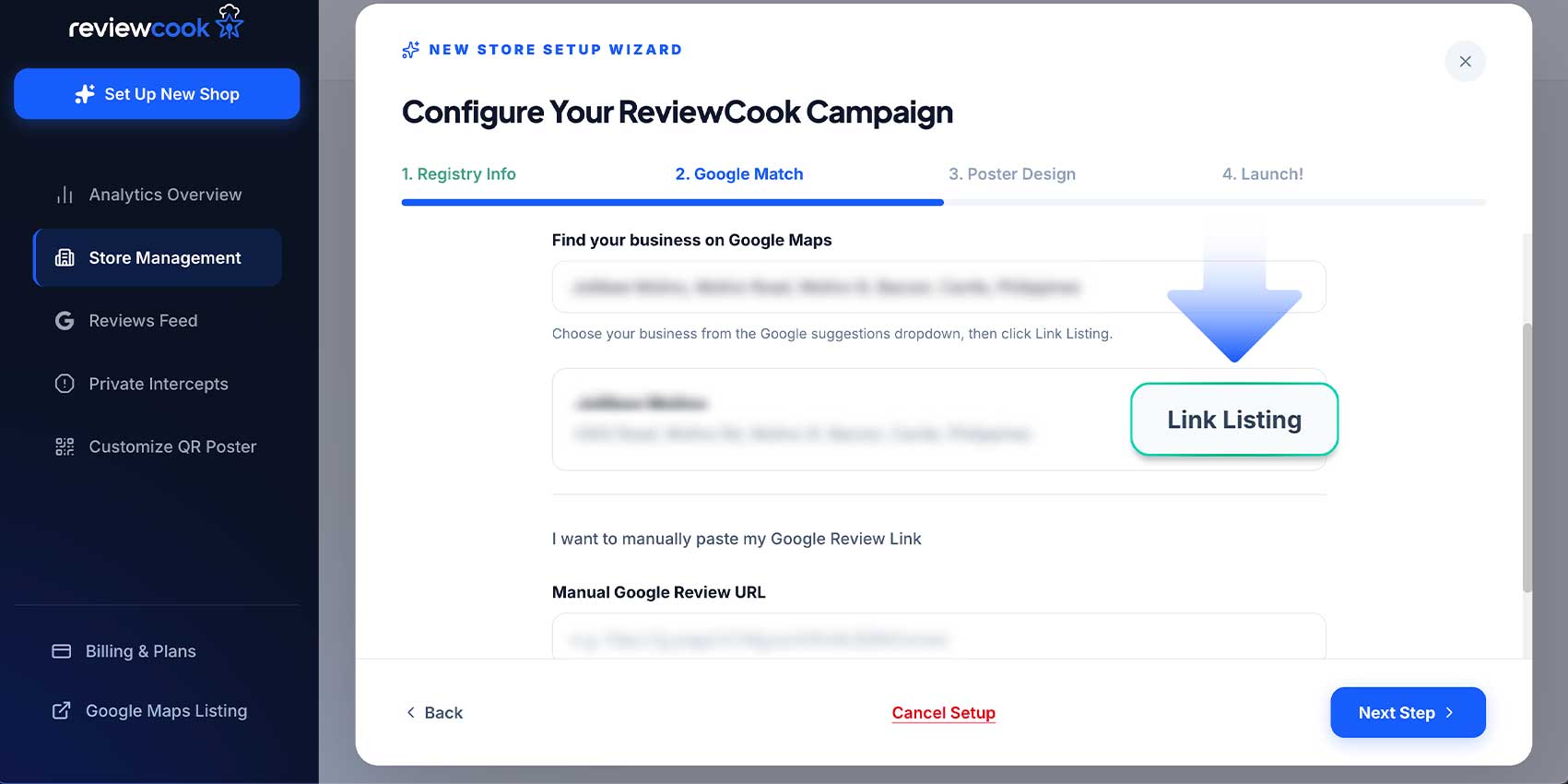
Step 6: Click “Link Listing”
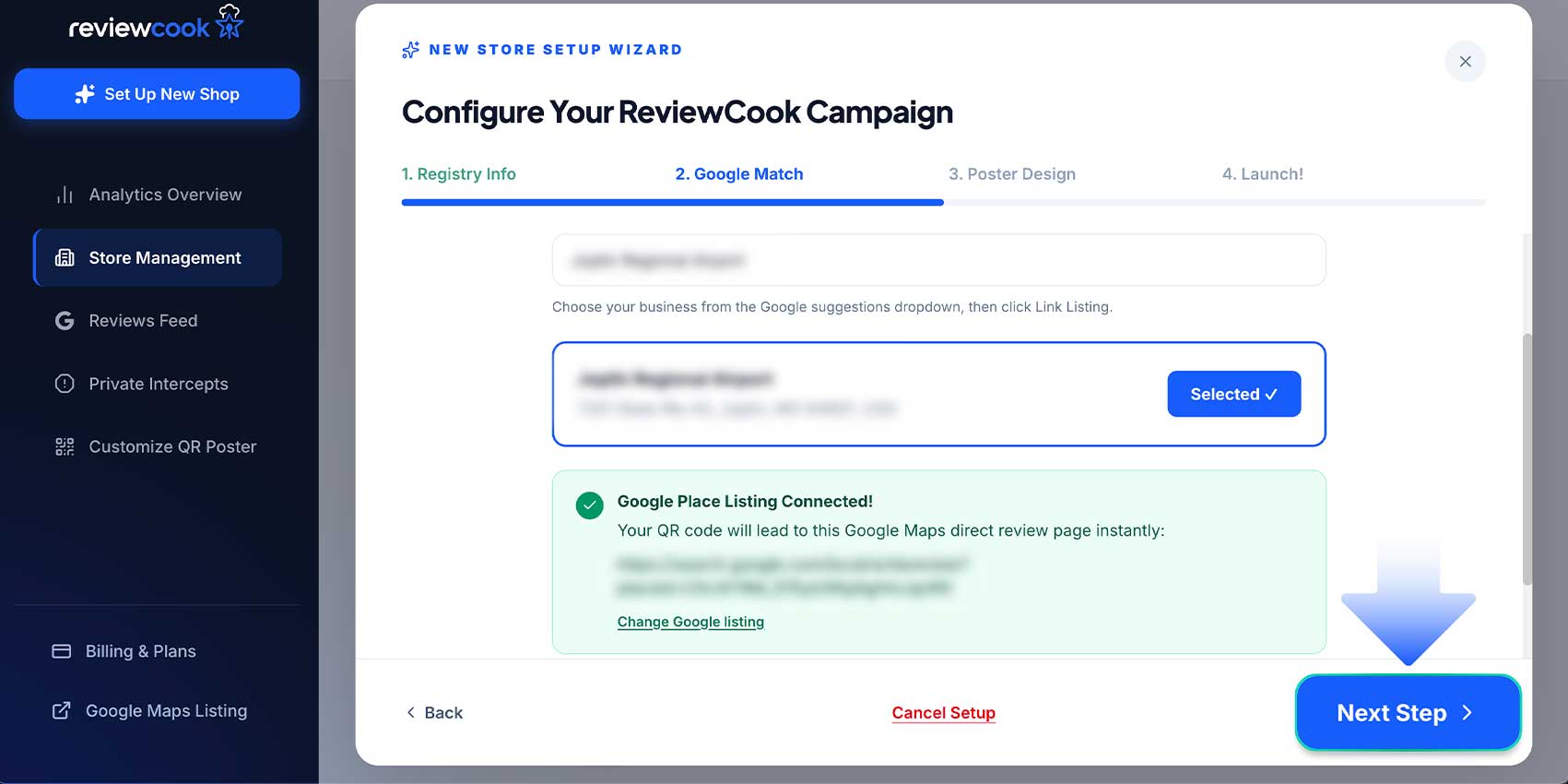
Step 7: Click Next Step to generate QR code
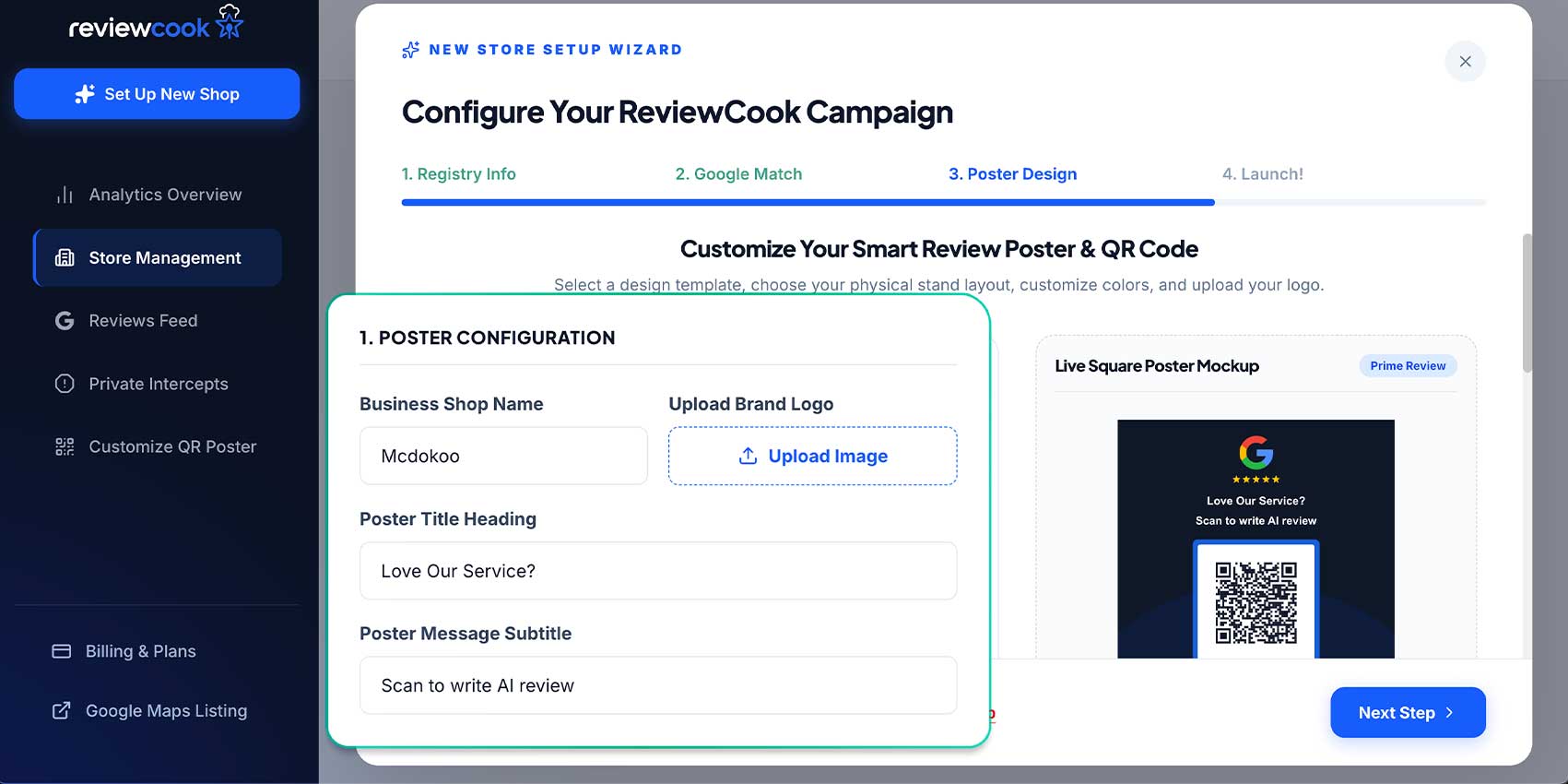
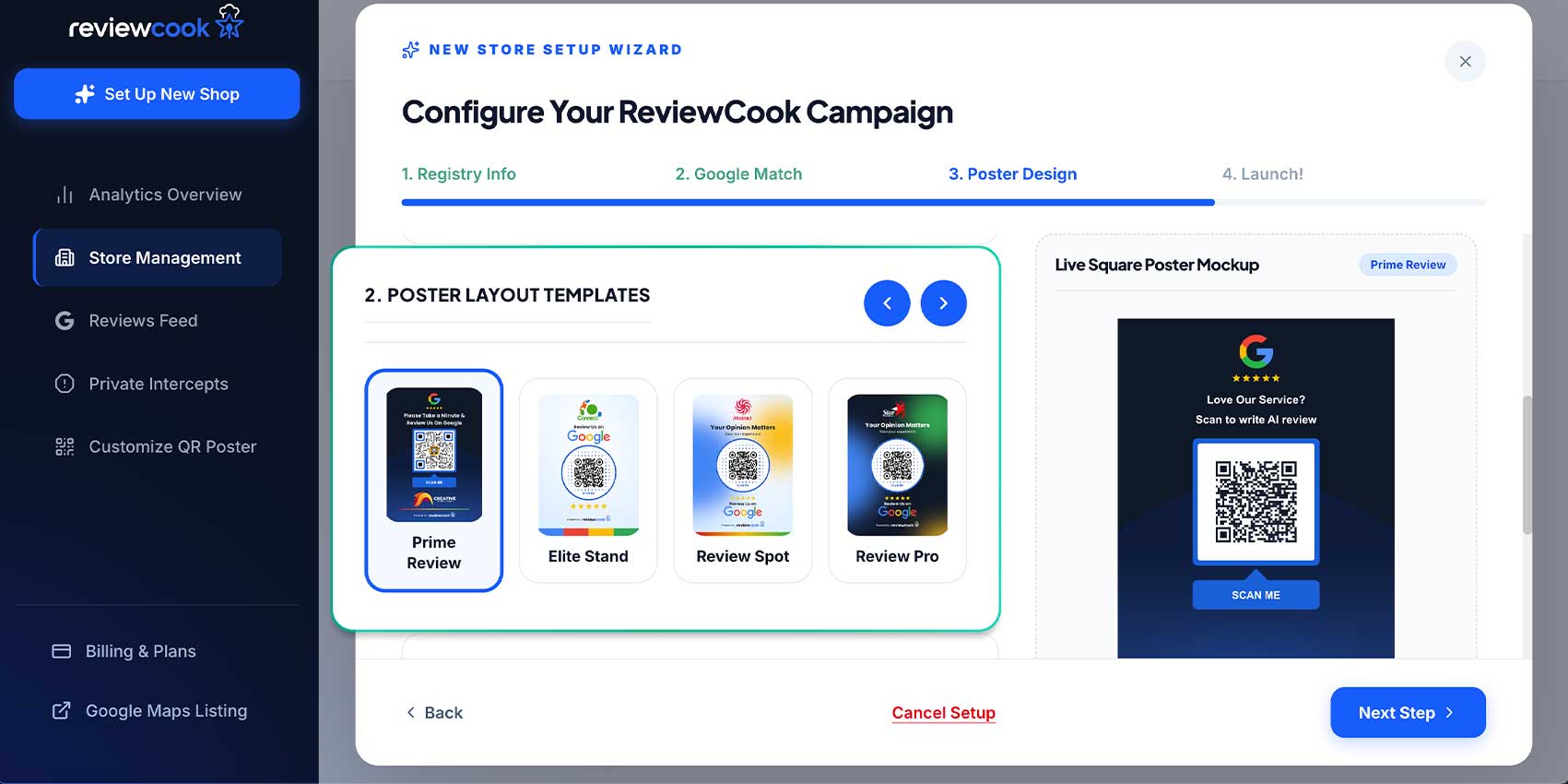
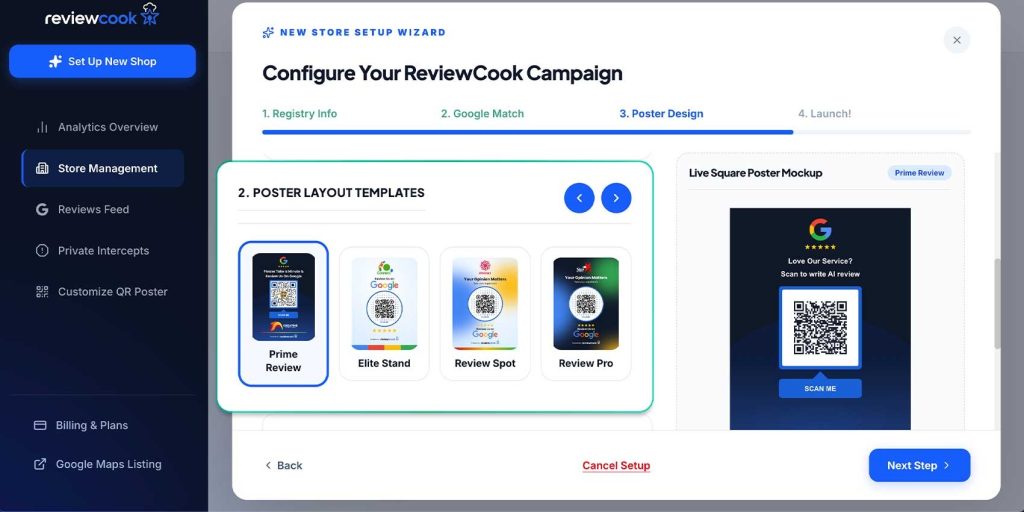
Step 8: Customize
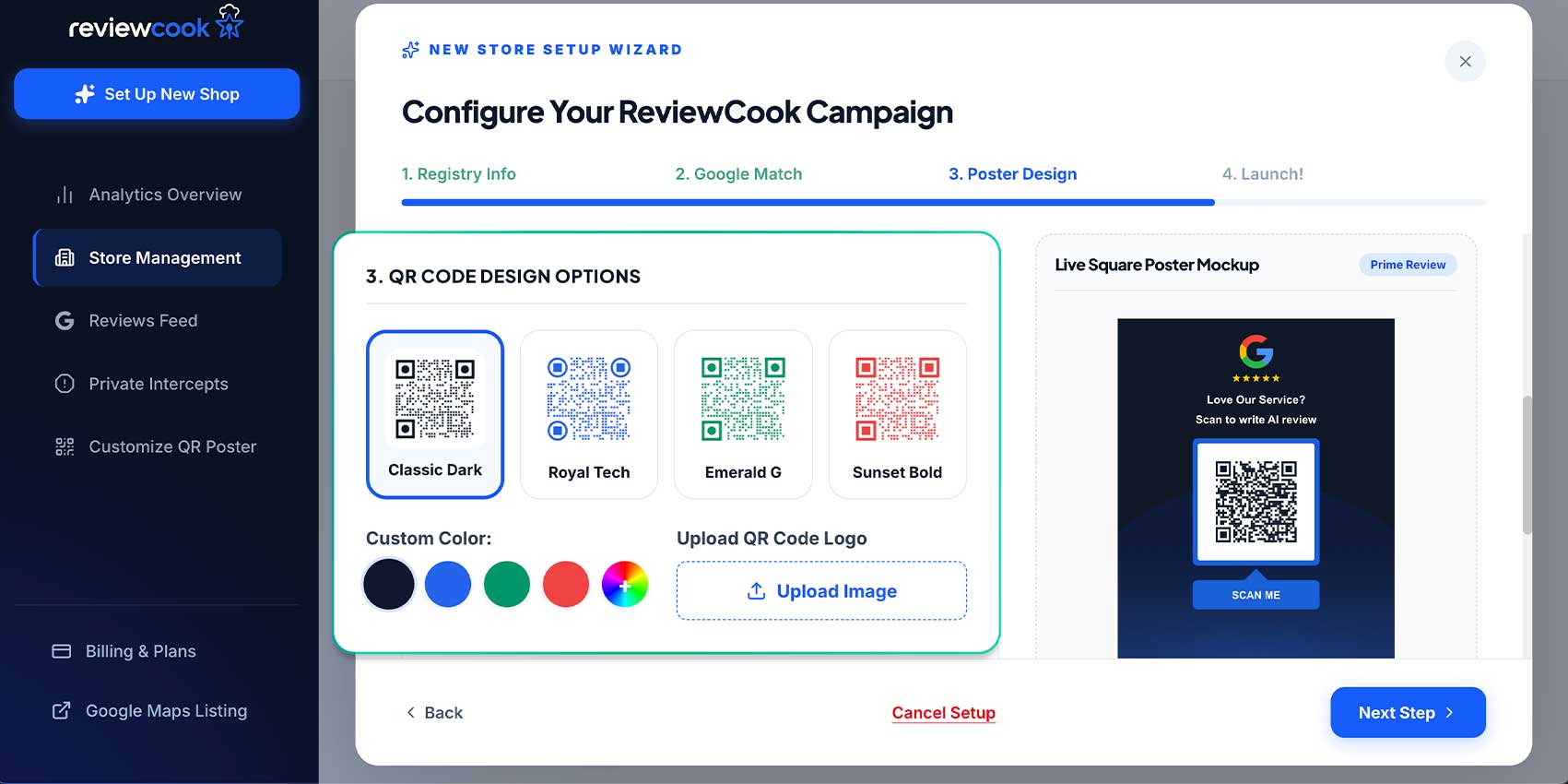
Customize your business’s QR code poster by uploading your brand’s logo, choosing your QR code template, and preferred design.
Step 9: Click Next Step
Review your QR code. If you’re satisfied, proceed to the next step
Step 10: Review details
Once you’ve reviewed all details, click “Finish and Launch Campaign.”
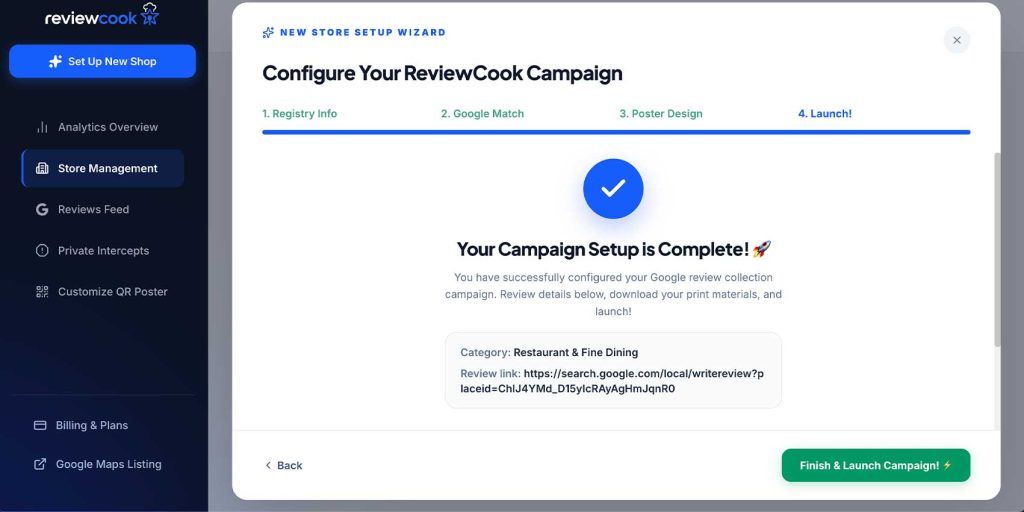
Congratulations! You have successfully created a ReviewCook account for your business! You can now edit and customize your brand’s QR code and monitor activity.
What’s the difference between a Static and Dynamic Review QR code?
Understanding the differences between static and dynamic QR codes helps you choose the right tool for your campaign.
| Feature | Static | Dynamic |
| Can the designation be changed? | No. Once the QR code is generated, the embedded URL is permanent. | Yes. You can update the destination at any time without creating a new QR code. |
| Need to reprint after changes? | Yes. Any change to the destination requires generating and printing a new QR code. | No. The same QR code continues to work even after the destination is updated. |
| Scan Analytics | None | Track scan count, device types, locations, and other engagement metrics (depending on the platform) |
| Best for Marketing | Better suited for one-time or permanent links that rarely change. | Ideal for ongoing marketing campaigns |
| Maintenance | Requires creating and distributing new QR codes whenever updates are needed. | Easy to manage from a dashboard, allowing changes without replacing existing QR codes. |
| Cost Over Time | Lower upfront cost can become expensive if reprinting is required. | May require a subscription, but saves time and printing costs by eliminating the need to replace QR codes. |
| Performance Insights | No visibility into how customers interact with the QR code. | Provides valuable data to measure campaign performance and optimize marketing strategies. |
| Common Use Cases | Business cards, permanent contact information, Wi-Fi access, or fixed website links | Google Review campaigns, product packaging, restaurant menus, event promotions, digital brochures, and marketing materials. |
| Best for | Individuals or businesses that need permanent QR codes with no future updates. | Businesses that want flexibility, analytics, and the ability to manage QR codes as their marketing needs evolve. |
Which is better for your business?
Static QR codes are a practical choice when the destination will never change, such as a permanent website or contact page.
However, for businesses using Google Review QR codes, dynamic QR codes offer far greater value. They allow you to update destinations, monitor scan performance, reduce printing costs, and adapt new marketing strategies without replacing existing QR codes.
For a long-term solution that can grow with your business, a dynamic QR code is the better investment.
Google Review QR Code vs. ReviewCook: Which is better?
Before creating a Google Review QR code, it is important to understand the differences between Google’s built-in QR code and a dedicated review management platform like ReviewCook.
| Feature | Google Review QR Code | ReviewCook |
| Cost | Free | Free and affordable paid plans available |
| QR Code Type | Static QR code | Dynamic QR code |
| Edit Destination After Printing | ❌ No | ✅ Yes |
| Need to Reprint After Printing | ✅ Yes | ❌ No |
| AI-Assisted Review Writing | ❌ none. Customers are taken directly to Google’s review page to write their own reviews. | Customers can either generate a review based on selected tags and star ratings or write one from scratch. |
| Negative Reviews | Visible on the Google Review page | Three-star ratings and below are sent as private feedback for the business owner to address. |
| Scan Analytics | ❌ Not available | ✅ Total scans, Google reviews created |
| QR Code Customization | ❌ No | ✅ Add logos, and choose colors and code designs |
| Campaign Management | ❌ No | ✅ Manage multiple QR codes from one dashboard |
| Marketing Flexibility | Best for simple, one-time use | Ideal for ongoing marketing campaigns |
| Store management | ❌ None | ✅Detailed scan and engagement data✅Total Google Reviews created✅ Average star rating✅ Private intercepts |
| Best for | Small businesses that only need a basic review link | Businesses that want to actively collect, monitor, and optimize Google Reviews. |
Which is a better option for your business in the long run?
While Google’s built-in QR code is a quick and free way to collect customer reviews, its functionality is limited to a static QR code with no customization or performance tracking.
ReviewCook, on the other hand, offers a more comprehensive solution with QR codes, AI-assisted review writing, scan analytics, and review management.
If you simply need a basic review link, Google’s QR code is sufficient. However, for businesses looking to collect more reviews, monitor performance, and actively manage their online reputation, Reviewcook is the better long-term choice.
Best Practices for creating a Google Review QR code
- Use a dynamic QR code: Choose a dynamic QR code if you plan to use it long-term. Unlike static QR codes, you can update the destination without reprinting, making it ideal for changing review links, campaigns, or business information.
- Add a clear call to action: Pair your QR code with a short instruction like “Scan to Leave a Google Review” so customers will immediately know what they’re scanning and why.
- Customize your QR code: Add your logo or brand colors to increase recognition, maintain high color contrast, and a white border to ensure reliable scanning
- Test it before sharing or printing: Test the QR code using both Android and iOS devices under different lighting conditions. If you’re printing it, test a physical copy to ensure its scannability.
- Use a high-resolution file: Download your QR code in a high-quality SVG format to keep it sharp and scannable at any size.
- Make it large enough to scan: Follow the 10:1 rule, where the QR code should be about one-tenth of the expected scanning distance. As a minimum, print your QR code at 2 x 2 cm (0.8 x 0.8 inches) for reliable scanning.
- Follow Google’s review policies: Ask all customers to leave honest feedback. Do not offer incentives or request only positive reviews, as this violates Google’s review guidelines.
By following these practices, you’ll create a Google Review QR code that’s easy to scan, encourages more customer feedback, and helps you collect reviews more effectively.
What is the ideal size to print your QR code?
An important thing to remember about QR code sizing is the 10:1 ratio: your QR code should be at least one-tenth the size of its intended scanning distance to ensure reliable scanning.
| Display Material | Ideal QR Code Size |
| Business Card | 2 x 2 cm (0.8 x 0.8 in) |
| Table Standee | 5-7.5 x 5-7.5 cm (2-3 x 2-3 in) |
| Window Poster | 10-15 x 10-15 cm (4-6 x 4-6 in) |
| Standing Banner | 15-20 x 15-20cm (6-8 x 6-8 in) |
Choosing the right QR code size is just as important as choosing the right destination. A QR code that’s printed too small will lead to failed scans and a poor user experience.
By following the recommended dimensions and the 10:1 rule, you can ensure your Google Review QR code remains easy to scan across different devices and display materials.
Best places to display your QR code
Place your Google Review QR code where customers naturally have a moment to scan it. Displaying your QR code at the right touchpoints increases chances of receiving more reviews while the customer experience is still fresh.
At the checkout counter
Place your QR code near the cash register or payment terminal so customers can quickly leave a review after completing their purchase. This is one of the most effective locations because the interaction is still recent.
Why this works: Customers have just completed a transaction, making it the best time to ask for feedback. A visible QR code at checkout lets them leave a review in just a few seconds.
On receipts and invoices
Adding a QR code to receipts gives customers an easy way to leave feedback after they’ve had time to use your product or service. A simple message like “Tell us about your experience” can encourage more scans.
Why this works: Receipts and invoices are often reviewed after a transaction, giving customers another opportunity to scan your QR code at their convenience. This is effective for businesses where customers need to experience a product or service first before leaving feedback.
Inside your business
Display your QR code on table standees, menus, posters, windows, waiting areas, or reception desks. These high-visibility locations make it convenient for customers to leave a review before they leave your establishment.
A study found that 64% of consumers have scanned a QR code in-store while making a purchase, making this an effective way to gather Google Reviews for your business.
Why this works: This strategy turns the moment of highest customer satisfaction into instant action by removing friction, preventing “I’ll do it later” drop-off, and consistently prompting every customer to leave feedback with a simple scan.
Email and Newsletters
Adding a Google Review code or review link to your email or customer newsletter provides another opportunity for satisfied customers to leave feedback without requiring extra effort.
Personalize your emails by mentioning the customer’s name and a recent purchase or service they availed. These personal touches create a connection with your client, inclining them to leave a positive review.
Why this works: Customers who receive review requests via email have already interacted with your business and are likely to trust it. Including a QR code for a review link provides a convenient way for customers to leave feedback.
Product packaging and delivery/company vehicles
Packaging functions no longer stop at product protection. They can also serve as avenues for online interaction. Restaurants and cafes can place a QR code on paper or plastic bags.
Service-based companies and businesses that deliver their products can place their QR codes on company vehicles. Customers often see these vehicles during or immediately after a service, making it a convenient time to scan the code and leave a review.
This makes it easy for customers to leave a review without needing to go to the store.
Why this works: A Google Review QR code on your product packaging or company vehicle works because it turns every delivery or service visit into a low-effort review opportunity.
Thank-you cards
Not only are thank-you cards a proven strategy for gaining loyal customers, but including a Google Review QR code lets customers conveniently leave feedback.
A business owner on Reddit shared:
“I use thank you cards to write a message to customers and to give backing/stiffen small packages I send out. Some people leave comments about it being a nice touch or they love the stickers/designs of the cards I put in so it comes down to how moved folks are.”
Why this works: Thank-you cards naturally express appreciation. Pairing them with a QR code feels like a friendly invitation rather than a sales pitch, increasing the likelihood of receiving genuine reviews.
Common mistakes to avoid
- Linking to the wrong Google page: If your QR code leads to your homepage or Google Business profile instead of the review page, customers have to take extra steps to find where to leave a review. This added friction increases the chances that they’ll abandon the process altogether.
- Printing low-quality QR codes: Blurry or pixelated QR codes are difficult for smartphone cameras to read, leading to failed scans and a frustrating customer experience.
- Making the QR code too small: Tiny QR codes are harder for cameras to read, especially after printing or when scanned from a distance. This leads to slow, unreliable, or failed scans, discouraging customers from leaving a review.
- Using poor color contrast: QR codes rely on clear contrast between the foreground and background to be scanned accurately. Low-contrast color combinations can make the code difficult for cameras to detect, reducing its effectiveness.
- Adding too much text around the QR code: Crowded designs can distract customers from the QR code and make it less obvious what action they should take. A clean layout helps the QR code stand out and encourages more scans.
- Skipping testing before printing: Discovering the broken or incorrect QR code after printing can be costly and may cause customers to lose trust if they can’t access the intended page. Testing beforehand ensures the QR code works across different devices and scanning apps.
- Offering incentives for reviews: Avoid giving discounts, gifts, or rewards in exchange for reviews, as this violates Google’s review policies and may result in removed reviews or account penalties.
Why Google Review QR codes are important for your business
With a single QR code scan, customers can instantly visit your website, leave a Google review, browse a digital menu, redeem promotions, or access important information, bypassing the need to manually search or type in a URL.
For businesses, QR codes help ease customer experience while increasing engagement and conversions. A Google Review QR code takes customers directly to your review page, making it faster and more convenient to leave feedback
Whether displayed on receipts, packaging, storefronts, or marketing materials, QR codes offer a simple, cost-effective way for businesses to improve customer engagement, strengthen their online reputation, and grow their brand.
How do Google Reviews affect online visibility?
Google improves your business’s online visibility by showcasing your verified Google Business Profile in local Google Search results and on Google Maps.
Businesses with complete and accurate information, recent customer reviews, updated photos, and relevant local keywords are more likely to rank higher in local searches. This helps your business reach customers who are actively searching for services in your area.
The more visible your business is, the more opportunities you have to attract website visits, phone calls, direction requests, and in-store visits.
Over time, maintaining an optimized Google Business profile can strengthen your online presence, build trust with potential customers, and improve your local ranking on Google’s local search algorithm.
Let’s assess what we’ve learned
Creating a Google Review QR code is one of the simplest ways to make it easier for customers to leave feedback. By directing customers straight to your Google review page, you remove unnecessary steps and improve customer experience.
Choosing a dynamic QR code, following the best practices, and placing your QR code at the right customer touchpoints can further maximize its efficiency.
Whether you use Google’s built-in QR code or a dedicated platform like ReviewCook, the right strategy can help strengthen your online reputation and grow your business.
Make a Google Review QR code for your business
Google Reviews play a vital role in helping businesses build trust, improve local search visibility, and attract new customers.
A well-placed Google Review QR code makes the review process quick and convenient, encouraging more customers to share their experiences while they’re still fresh.
By using the right QR code solution, following proven best practices, and avoiding common mistakes, you can create a seamless review experience that benefits both your customers and your business.
Start using a Google Review QR code today and turn every positive customer interaction into an opportunity to grow your online presence.
Frequently Asked Questions
You can create a Google Review QR code by copying your Google Business Profile review link and generating a QR code with Google's built-in tool or a platform like ReviewCook.